

Knowledge Bases
Connect your team's documents. Everyone gets the same answers to the same questions.
What this is
Upload a collection of your team's documents (policies, SOPs, training materials, FAQs). Anyone on your team can ask questions about them.
Same question = same answer (no more "I think it says..." guessing).
Before you start
You need:
- Documents to upload (PDFs, Word docs, etc.)
- Permission to share them with your team
- A question that multiple people will ask repeatedly
Step-by-step: Create a knowledge base
1. Go to Knowledge Bases
From the dashboard, click Knowledge Bases (sidebar or main menu).
2. Create new
Click [Create Knowledge Base]
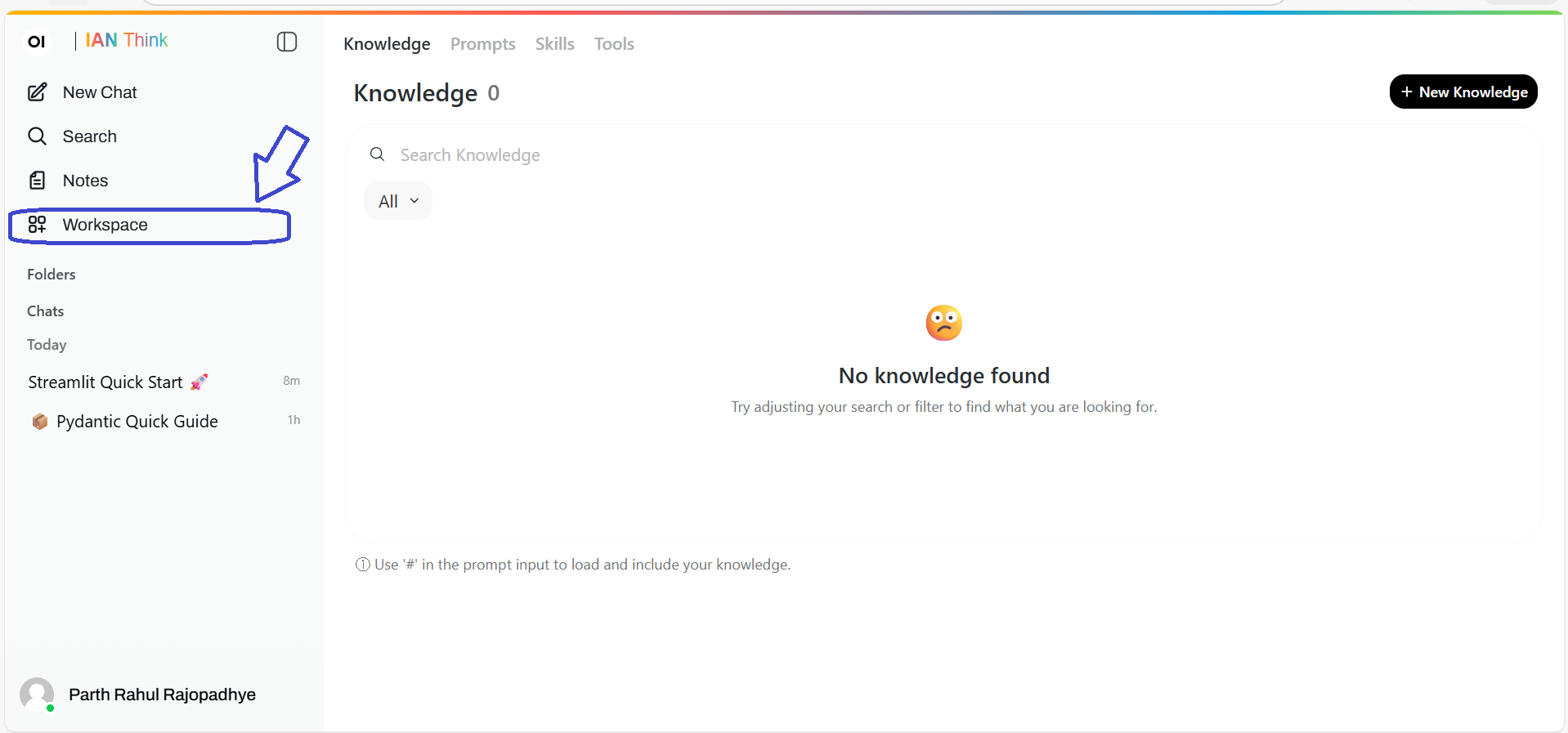
3. Name it
"Company Policies" or "Claims Procedures" or "Onboarding Guide"
Pick something your team will understand.
4. Add documents
Click [Add Documents] or drag documents in.
Upload:
- Policies
- Standard operating procedures
- FAQs
- Training materials
- Any docs your team references repeatedly
Max 100 documents per KB (or ask admin if you need more).
5. Wait for processing
IAN indexes the documents (5–30 minutes depending on size).
You'll see a progress bar. When it's done, the KB is ready.
6. Share the link
Click [Share]. Copy the link.
Share with your team via Slack, email, etc.
Using a knowledge base
For your team
- Go to the shared link
- You see a chat interface
- Type a question: "What's our policy on remote work?"
- IAN searches the knowledge base and answers
It's like chat, but with your data instead of the general web.
For you (the creator)
You can:
- Add more documents anytime
- Remove outdated documents
- See a list of questions people ask
- Edit documents if needed
When this is useful
Use case 1: Onboarding
Upload: Employee handbook, benefits guide, office procedures, security policies
New employee asks: "What are the WiFi password requirements?"
IAN answers from the handbook. No need to bother the admin.
Use case 2: Process documentation
Upload: Claims procedures, underwriting guidelines, approval workflows
Claims team asks: "What documents do I need to request for [claim type]?"
IAN answers from procedures. Consistent process, every time.
Use case 3: FAQ automation
Upload: Customer FAQ, common questions you get
Customers ask: "Do you cover [scenario]?"
IAN answers from the FAQ. Reduces support tickets.
Use case 4: Institutional knowledge
Upload: Everything (policies, emails, docs, presentations)
Team members ask: "How did we handle [situation] last year?"
IAN searches and answers. Knowledge doesn't walk out the door when someone leaves.
Best practices
Practice 1: Keep it focused
One KB = one topic or department.
"Sales Playbook" KB (good)
"Everything" KB (bad—too big, too many irrelevant results)
Practice 2: Update documents regularly
Remove outdated docs. Update policies when they change.
Old information is worse than no information.
Practice 3: Use clear document names
"Sales Process 2025.pdf" (good)
"Document.pdf" (bad)
Clear names help IAN find the right info.
Practice 4: Add context in documents
If a policy is confusing, add a summary at the top: "This policy covers X. Use it when Y."
IAN uses this context to give better answers.
Practice 5: Monitor questions
Most KB tools show you what people ask. Watch for:
- Repeated questions (means a doc needs to be clearer)
- Questions you can't answer (means you're missing a doc)
- Misunderstandings (means a doc needs rewriting)
Use this feedback to improve.
Examples
Example 1: Claims team KB
Documents:
- Claims procedures manual
- Approval thresholds
- Required documentation checklist
- Common claim types guide
Team asks: "What documents do I need for a homeowner claim?"
KB answers: "For homeowner claims, typically: proof of loss, photos, repair estimates, [full list]. See page 3 of procedures."
Example 2: Sales KB
Documents:
- Sales playbook
- Deal structure templates
- Competitor comparison
- Common objection responses
Team asks: "How do I respond to 'Your product is too expensive'?"
KB answers: "Common response: [from playbook]. You might also reference [competitor comparison]."
Example 3: HR KB
Documents:
- Employee handbook
- Benefits guide
- Vacation policy
- Expense policy
- Parental leave policy
Employee asks: "Can I work remotely on Fridays?"
KB answers: "Per the handbook, remote work is [policy details]."
Limitations
❌ Can't upload real-time data — If your KB needs to be live (like pricing), use Web Search
❌ Can't understand private/proprietary formats — Stick to common document types
❌ Can be out of sync — If you forget to update docs, answers will be outdated
Troubleshooting
"Answers seem wrong"
- Check if the document is in the KB (it might not have been uploaded)
- Check if the document is outdated (update it if needed)
- Ask IAN to quote its source (check the quote)
"A document didn't upload"
Check:
- File size (under 20 MB?)
- File format (PDF, Word, TXT?)
- File isn't corrupted
Try downloading/re-saving and uploading again.
"People keep asking questions the KB can't answer"
You're missing a document. Add it and re-index.
Or the existing documents need to be clearer. Rewrite them.
"The KB is getting too big"
Delete old documents. Create separate KBs for different topics.
One giant KB is harder to search and gets slower.
Privacy and access
Who can access? Anyone with the shared link (you control access)
Can they edit? No. Only view and ask questions.
Can admins see queries? Yes (audit/compliance)
Is it encrypted? Yes, same as regular chat.
Privacy Policy · Data Security
Tips for success
Tip 1: Start with one KB
Don't create a KB for everything. Start with your team's most-asked questions.
Build from there.
Tip 2: Make it easy to find
Put the KB link in Slack, your wiki, or somewhere people look.
If no one knows it exists, no one will use it.
Tip 3: Ask it questions yourself first
Before sharing, test the KB. Ask it your team's real questions.
Make sure it works before people start relying on it.
Tip 4: Update based on feedback
Monitor what people ask. Improve docs based on patterns.
A KB that evolves is useful. A static KB becomes stale.