

Follow-Up Questions
Let IAN suggest what to ask next. Explore deeper without getting stuck.
What this is
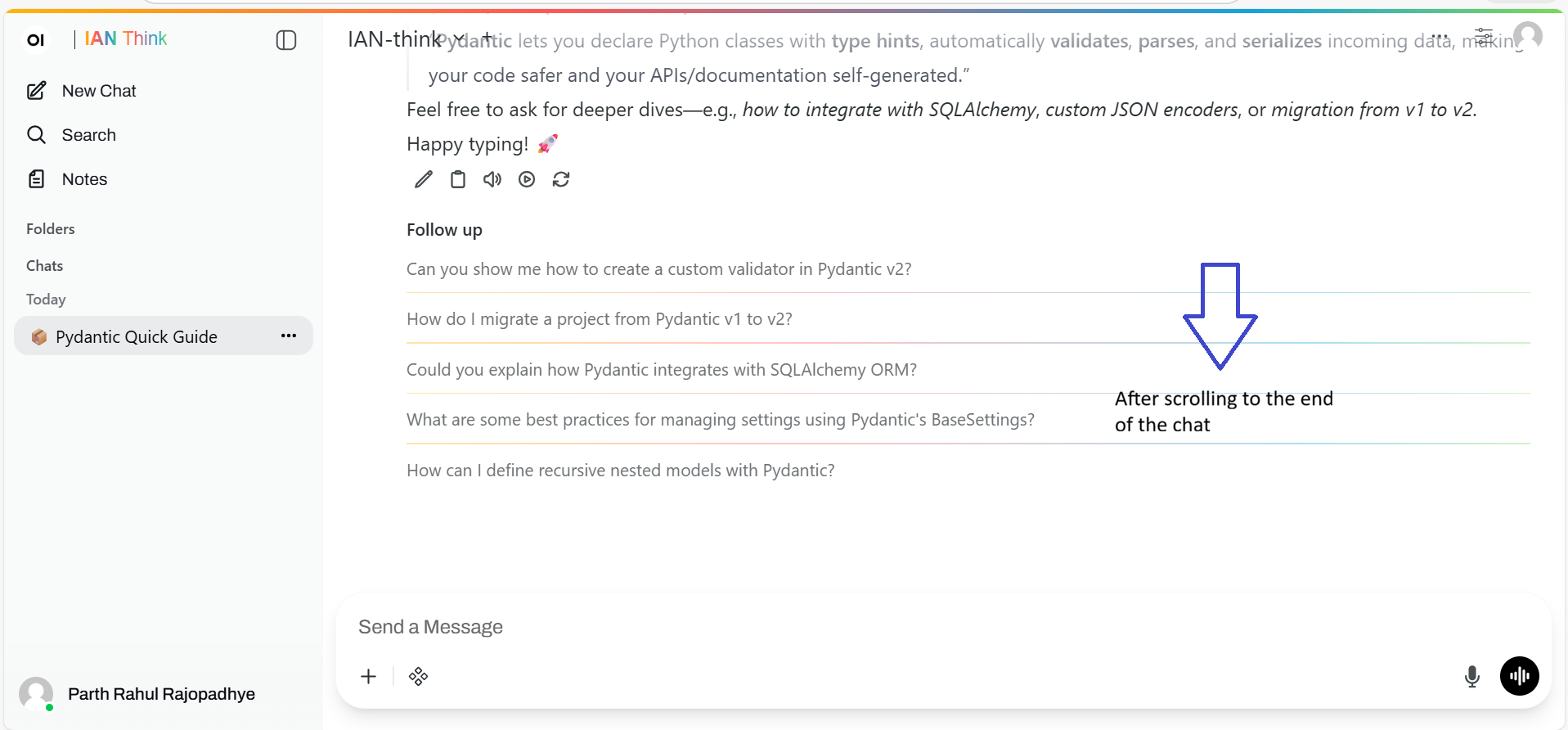
After IAN responds, you see 3–5 auto-generated follow-up questions.
These are things you might want to explore next. You don't have to use them. But they're there when you're not sure what to ask.
Before you start
You're in a chat. IAN just gave you an answer. Below the answer, you see suggested questions.
How it works
You ask something
"What's a CAT bond?"
IAN answers
A CAT bond (catastrophe bond) is a debt security issued by insurance companies to transfer catastrophe risk to investors...
IAN suggests follow-ups
- "What are the risks of investing in CAT bonds?"
- "How do CAT bonds differ from traditional reinsurance?"
- "Give me an example of a recent CAT bond issuance"
- "What companies typically issue CAT bonds?"
- "How are CAT bond returns structured?"
You pick one (or ignore them)
Click any suggestion. IAN responds to that question.
Or type your own question. The suggestions are just ideas.
When they're useful
Situation 1: You're exploring a topic
You asked about claims processes. Now you want to dig deeper.
Instead of thinking "what should I ask next?", you see suggestions. Click one and keep going.
Situation 2: You're stuck
You got an answer but it's not quite satisfying. You don't know what to ask next.
The suggestions might spark an idea. Or give you a new angle.
Situation 3: You're building knowledge
You're learning about a new system or process. The suggestions let you explore systematically.
Situation 4: You're documenting
You're creating a guide or FAQ. The suggestions help you think of angles you'd miss.
Tips for using follow-ups
Tip 1: Use them to go deeper
Follow-up 1: "How does CAT bond pricing work?"
Follow-up 2: "What's the relationship between CAT bond pricing and historical catastrophe data?"
Follow-up 3: "Give me a concrete example with real numbers"
Each follow-up builds on the last. You learn more with each step.
Tip 2: Use them to change direction
Don't like where the conversation is going? The suggestions might point to something more useful.
Original answer: About CAT bonds in general
Suggestion: "What companies typically issue CAT bonds?"
New direction: Specific companies and strategies
Tip 3: Skip the ones that don't help
If none of the suggestions are useful, just type your own question. The suggestions are suggestions, not requirements.
How good are the suggestions?
Sometimes excellent: They're exactly what you wanted to ask next.
Sometimes okay: They're relevant but not what you need. That's fine. Type your own.
Sometimes weird: IAN suggests something that doesn't make sense. Ignore it and ask something else.
The suggestions are generated by AI, so they're not perfect. They're helpful scaffolding, not gospel.
Can I turn them off?
Not per-chat. But you can ignore them. Just type your own question.
If you want a global setting, check Settings & Preferences.
Examples
Example 1: Learning about a process
Question: "What's the claims intake process?"
IAN answers with the basic steps.
Suggested follow-ups:
- "What information do we need to collect during intake?"
- "What are common mistakes people make during intake?"
- "How long does intake usually take?"
- "What systems do we use for intake?"
You pick: "What are common mistakes?" → Learn what to avoid
Then you pick: "What information do we need?" → Get specifics
Then you ask your own: "How do we handle edge cases?" → Drill into your concern
Example 2: Solving a problem
Question: "We're seeing a spike in claims delays. What could cause that?"
IAN answers with potential causes.
Suggested follow-ups:
- "How would you diagnose which cause is happening?"
- "What metrics should we track?"
- "How do delays impact our SLA compliance?"
- "What's the industry standard for claims processing time?"
You pick: "How would you diagnose?" → Get a methodology
Then: "What metrics should we track?" → Know what to measure
Then your own: "Can you draft an email to the team explaining the issue?" → Practical output
Example 3: Research and documentation
Question: "Explain how machine learning is used in insurance underwriting"
IAN answers with general overview.
Suggested follow-ups:
- "What are the benefits of ML underwriting?"
- "What are the risks or limitations?"
- "Can you give an example of how it works?"
- "How does ML underwriting differ from traditional underwriting?"
- "What data does ML underwriting typically use?"
You: Click all of them methodically. Now you've got comprehensive coverage for a training document.
Pro tips
Pro Tip 1: Export your conversation
After you've explored deeply with follow-ups, export the whole chat. You've basically created documentation.
Click ⋮ → Export → Pick format → Download
Pro Tip 2: Follow-ups work best with documents
Upload a document. Ask a question about it. Use follow-ups to explore systematically.
You'll learn the document thoroughly.
Pro Tip 3: Use follow-ups for interview prep
Ask about a topic. Follow the suggestions to explore deeper.
You'll be ready for questions you hadn't thought of.
Pro Tip 4: Build checklists from follow-ups
If the follow-ups reveal a systematic process, you can extract them into a checklist.
Example:
- Follow-up suggests: "What are the prerequisites?"
- Follow-up suggests: "What's the step-by-step process?"
- Follow-up suggests: "What can go wrong?"
- Follow-up suggests: "How do you verify it's done correctly?"
Boom. You've got a checklist template.
When follow-ups aren't showing
If you don't see suggestions, it might be because:
- The model is still thinking (wait a sec)
- You've turned them off in settings
- The question was too specific to generate useful suggestions
Just type your own follow-up. No big deal.