

Document Analysis
Supported file formats, size limits, upload workflow, query patterns, accuracy model, and troubleshooting for document-based interactions in IAN Think.
Upload a file. Ask questions about it. Get answers grounded in your data — not from general knowledge.
No copy-pasting huge documents into chat.
Before you start
You need:
- A document in a supported format
- File size under 20 MB
- A question to ask about it
Supported formats
| Format | Extensions | Notes |
|---|---|---|
.pdf |
Must contain selectable text. Scanned-image PDFs may be illegible. | |
| Word | .docx |
Legacy .doc files (pre-2007) are not supported. Save as .docx before uploading. |
| Plain text | .txt, .md |
Includes Markdown files. |
| Spreadsheet | .csv, .xlsx |
Optimal for structured and tabular data. Legacy .xls files (pre-2007) are not supported — save as .xlsx before uploading. |
Size and complexity limits
| Constraint | Limit |
|---|---|
| Single file size | 20 MB (recommended: ≤ 10 MB for optimal processing speed) |
| Total per message | 50 MB (multiple files permitted, no hard cap on file count) |
| Document length | Documents over ~50 pages may experience reduced recall in later sections. See Best practices §4 for the recommended approach. |
Unsupported inputs
- Embedded images, charts, or graphs (IAN processes extracted text only)
- Handwritten documents
- Password-protected PDFs (remove protection before uploading)
- Proprietary or uncommon file formats
- Legacy
.docand.xlsfiles (convert to.docx/.xlsxfirst)
Step-by-step
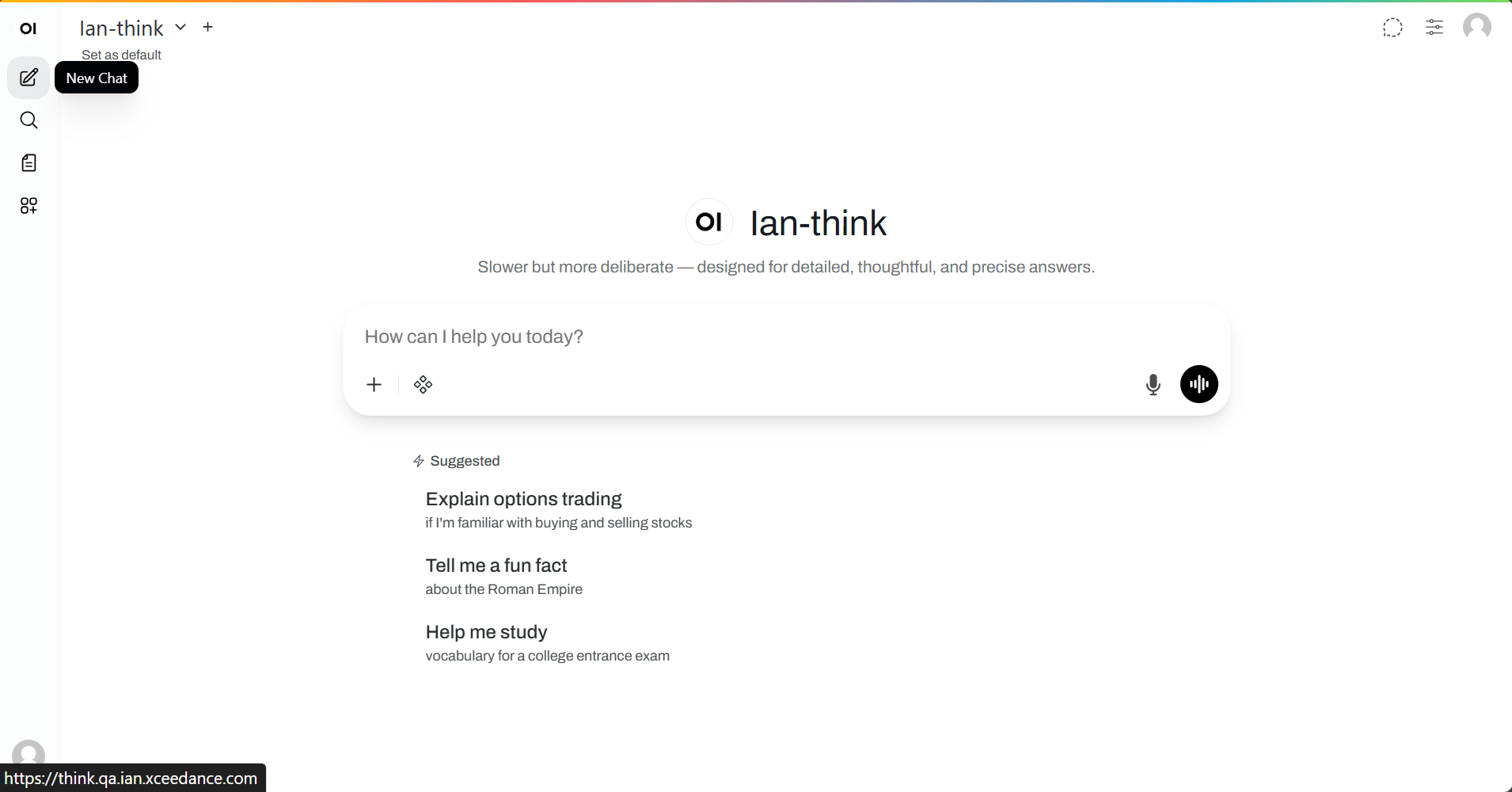
1. Create a chat
Click [+ New Chat] from the dashboard.
2. Attach a file
In the message box, click [Attach files] (paperclip icon) or drag a file directly into the message area.
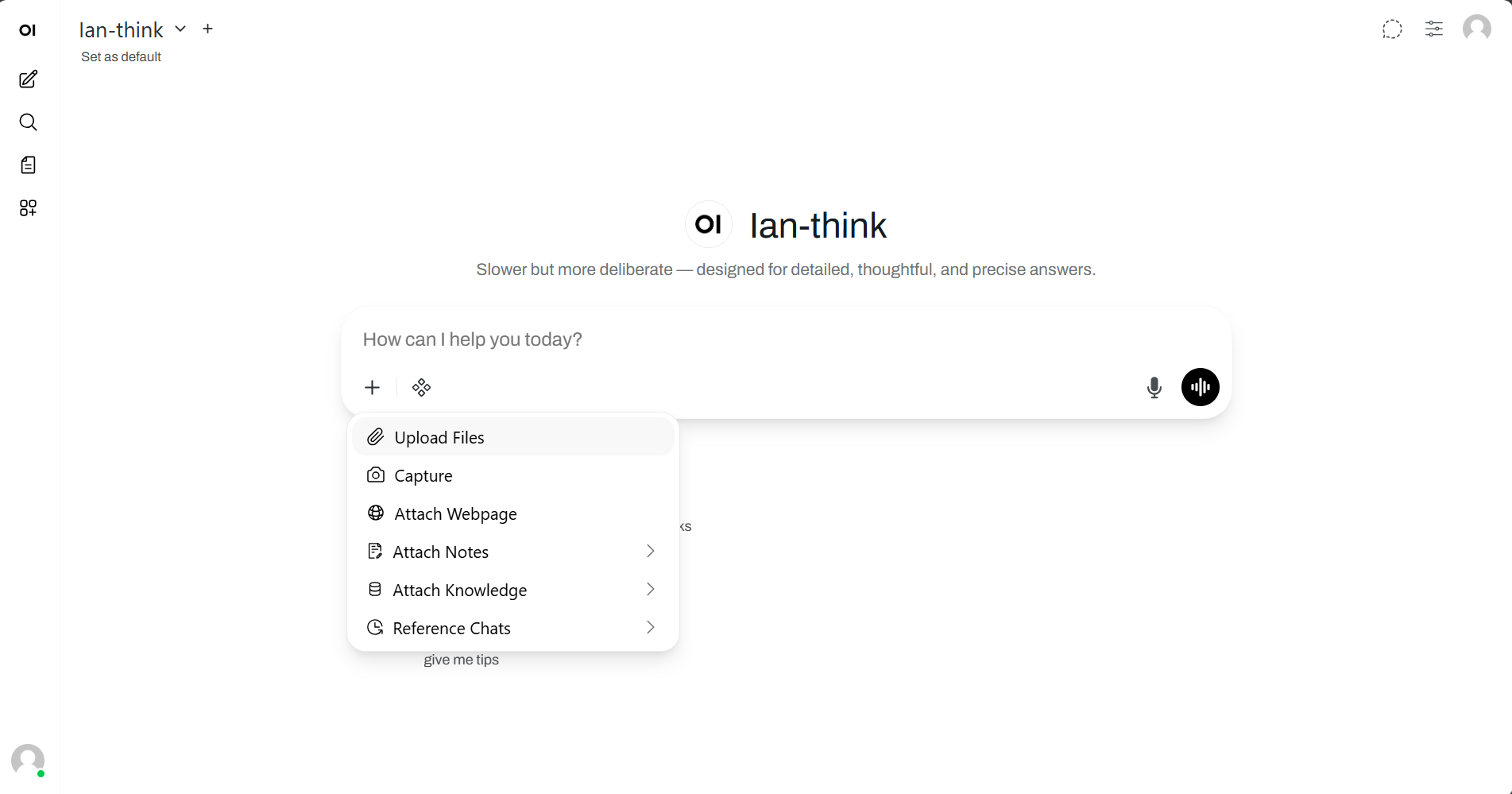
Successful attachment is confirmed when the file name appears in the message box. Multiple files can be attached in a single message.
3. Ask a question
Prompt specificity directly affects output quality.
Effective prompts:
| Prompt | Task type |
|---|---|
"Summarize this document in 5 bullet points" |
Summarization |
"What are the key risks mentioned in this report?" |
Extraction |
"Find all dates and deadlines" |
Structured extraction |
"What does Section 3 say about renewal terms?" |
Targeted retrieval |
"Extract the quarterly revenue numbers" |
Data extraction |
Low-yield prompts:
| Prompt | Issue |
|---|---|
"What's in this?" |
Too vague — produces unfocused output |
"Is this good?" |
Requires subjective judgment IAN cannot provide |
4. Send
Press Enter or click [Send ➜].
IAN reads the document (typical processing times vary by file size — see Processing time). Then it answers.
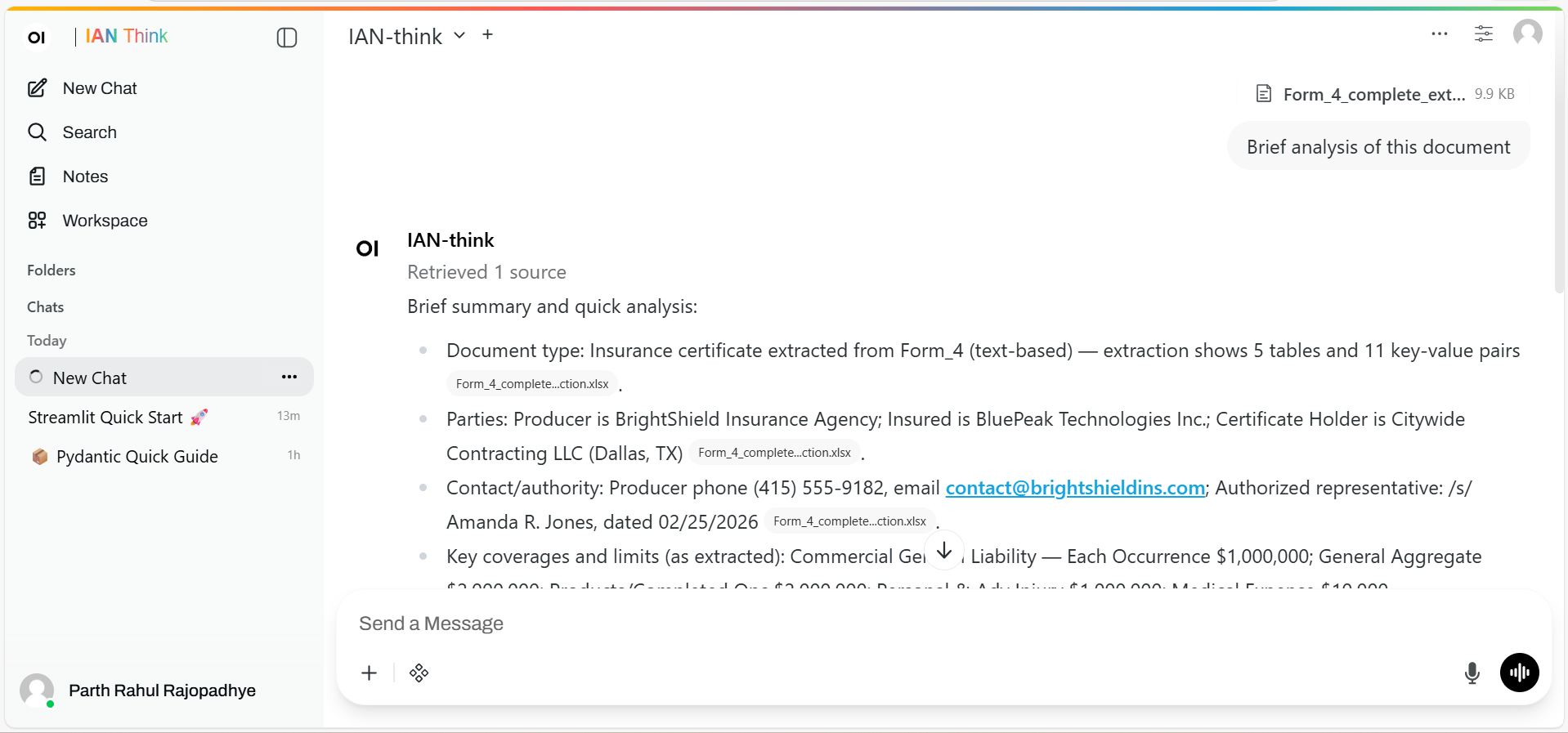
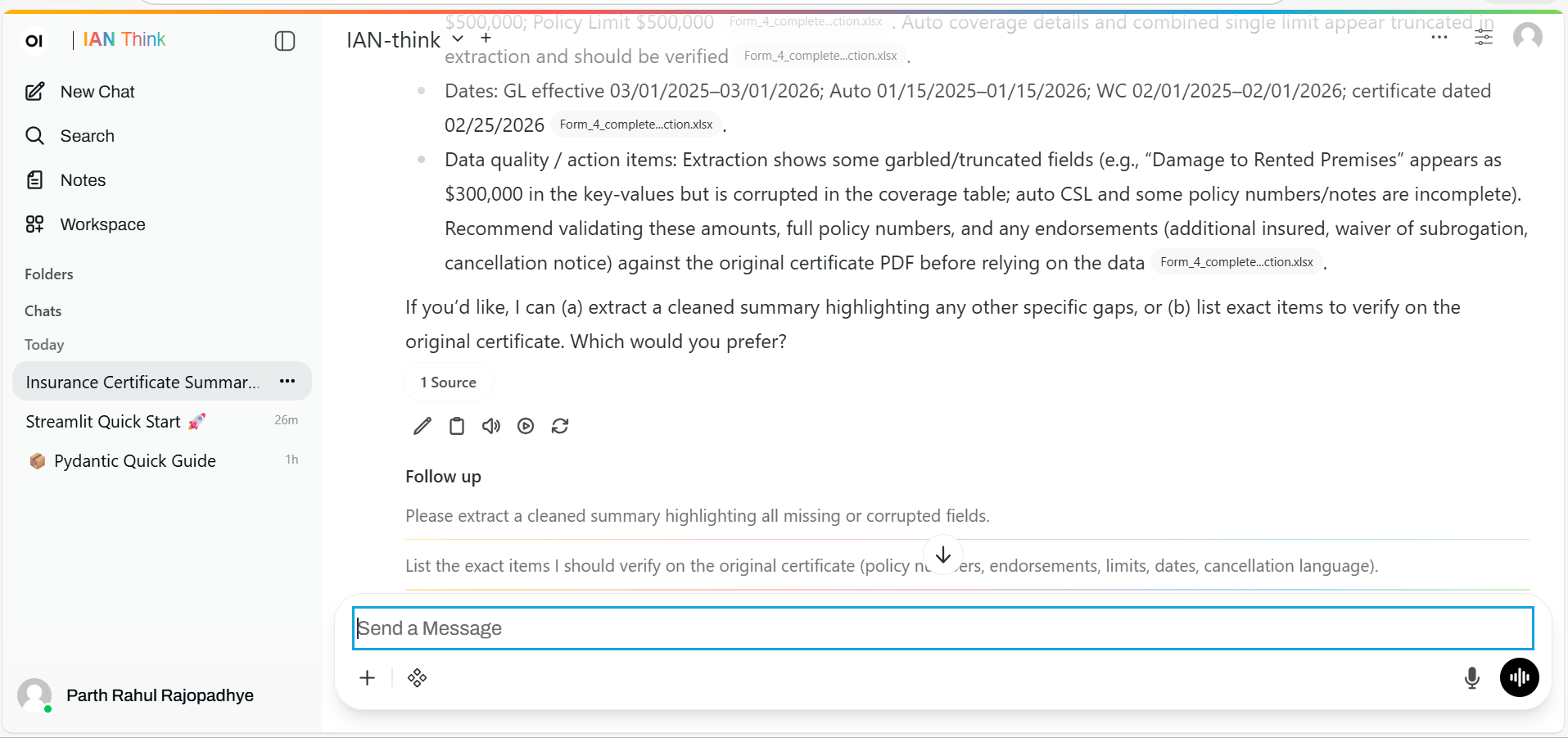
5. Ask follow-ups
IAN can reference the uploaded document throughout the conversation. For very large documents, it retrieves the most relevant sections for each question rather than holding the entire document in memory at once. You do not need to re-attach the file for follow-up questions.
Example follow-ups:
"Tell me more about that section""Quote the exact paragraph where it mentions [topic]""How does this compare to the other document I uploaded?""Explain that clause in simpler language"
6. Save if it matters
Click ⭐ to pin the conversation for future reference. Starred chats are retained longer than unstarred chats — check your organization's data retention policy for exact timelines.
What works well
| Operation | Reliability |
|---|---|
| Extracting explicit facts and numbers | High |
| Summarizing long documents | High |
| Locating specific sections or clauses | High |
| Answering questions where the answer is stated in the document | High |
| Comparing two documents side by side | High |
| Extracting tabular data from CSV/XLSX | High |
What doesn't work
| Operation | Limitation |
|---|---|
| Reading charts, graphs, or images | IAN processes extracted text only |
| Handwritten documents | Requires typed/printed text |
| Password-protected PDFs | Protection must be removed before upload |
Legacy Word files (.doc) and Excel files (.xls) |
Must be converted to .docx / .xlsx |
| Proprietary formats | Stick to common formats listed above |
| Extracting tabular data from PDFs | Variable accuracy — see Troubleshooting |
Accuracy
| Output type | Expected accuracy | How to verify |
|---|---|---|
| Direct facts and quotes | High | Prompt: "Quote the exact text where you found that" — then verify against the source document |
| Tabular data from CSV/XLSX | High | Cross-check extracted values against the original spreadsheet |
| Tabular data from PDFs | Variable | PDF table structures are often ambiguous. Extract the table to CSV for more reliable results. See Troubleshooting. |
| Interpretations and inferences | Variable | IAN may misread ambiguous language or miss context conveyed through formatting. Verify conclusions independently. |
Operating principle: Use IAN as a retrieval and summarization tool. Verify all interpretive outputs against primary sources.
Compliance note: For claims, underwriting, compliance, or legal work, always verify IAN outputs with official sources or a subject-matter expert. IAN is a research assistant, not a decision-maker.
Processing time
| File size | Typical time |
|---|---|
| < 5 MB | 5–8 sec |
| 5–10 MB | 8–15 sec |
| 10–20 MB | 15–30 sec |
Larger or complex documents take longer. If stuck past 60 seconds, see Troubleshooting.
Real examples
| Example | File uploaded | Prompt | What IAN returns | Approx. time saved* |
|---|---|---|---|---|
| Claims analysis | Claim file PDF | "Summarize the incident, damage, and policy coverage" |
Organized breakdown; follow up with "Is this a covered loss?" |
~5 min vs. manual review |
| Policy research | 50-page company policy | "What are the rules around remote work?" |
Exact policy excerpt with section reference; follow up on international or after-hours rules | ~10 min |
| Contract comparison | New vendor contract + standard template | "List any non-standard clauses in the new contract" |
Itemized differences with explanations; follow up on risk implications | ~50 min |
| Data extraction | Quarterly sales spreadsheet | "What's the growth rate for each region? Rank them." |
Formatted, ranked table with calculated growth rates | ~15 min |
| Report summarization | 40-page quarterly report | "What are the 3 most important takeaways?" |
Three bullet points with page references | ~38 min |
Note: Time estimates are approximate and refer to the generation of an initial AI-assisted output. Final reviewed results may require additional time depending on document quality, task complexity, and required human review.
Best practices
1. Be specific
❌ "What's in this?"
✅ "Extract the financial projections for Q1–Q4 2025, focusing on revenue, expenses, and margins"
Specific questions get better answers.
2. Ask for quotes
"Quote the section about [topic]"
"Give me the exact sentence where it mentions [thing]"
Quotes let you verify the answer yourself.
3. Upload related documents together
Analyzing a proposal? Upload both the proposal AND the company policy.
Then ask: "Does the proposal follow our policy on [topic]?"
IAN can compare across documents in the same chat.
4. Break up large documents
If your document exceeds ~50 pages or IAN seems to lose context:
- Split into 3–5 sections by topic
- Upload each in a separate session
- Ask about each separately
- Summarize the summaries at the end
Or use Knowledge Bases if your team needs to query the same docs repeatedly.
5. Build understanding systematically
Don't stop at one question. Keep going:
"What's the problem this solves?""What's the proposed solution?""What's the timeline?""What are the risks?""How does this align with our strategy?"
You're building understanding, not just extracting facts.
Troubleshooting
The file won't upload
Check file size: Under 20 MB? Check format: PDF, DOCX, TXT, MD, CSV, XLSX?
If too large:
- Split it into sections
- Upload sections separately
- Create a new chat per section
Still stuck? Try downloading and re-saving the file, then retry. If the problem persists, contact support.
IAN can't read the file
Happens with:
- Very old
.docor.xlsfiles (pre-2007) - Password-protected PDFs
- Scanned images without OCR
- Corrupted files
- Proprietary formats
Fix: Convert to text-based PDF or .docx and try again.
The answer seems wrong
- Ask:
"Quote the exact text where you found that" - IAN will cite the passage
- Check if it matches what you see in the document
If the quote is wrong, the AI misread. Try:
- Rephrasing your question
- Pointing IAN to the relevant section explicitly (e.g.,
"Look at page 12, the paragraph about…")
It keeps extracting wrong data from a table
Tables in PDFs are tricky. Workaround:
- Copy the table into a separate CSV or text file
- Describe the structure:
"Here's a table with columns: Date, Amount, Category" - Ask your question against the cleaner file
Much more reliable.
The document is 200 pages and it seems to lose context
See Best practices §4 above for the recommended splitting approach.
For additional diagnostics: Troubleshooting
Privacy
Uploaded documents are stored on Xceedance servers and encrypted in transit. They are accessible to organization admins for audit purposes and are not used to train LLMs.
| Detail | Description |
|---|---|
| Storage location | Xceedance-managed servers |
| Encryption | Encrypted in transit and at rest |
| Admin access | Organization admins can view uploaded files for audit purposes |
| LLM training | Uploaded documents are never used to train models |
| Retention | Subject to your organization's data retention policy — see Data Security |
Before uploading:
- Check you have permission to share the file
- If it is classified or confidential, ask your admin first
- Redact PII if possible